Admin Website Settings
Admin Portal Settings
Estimated reading: 1 minute
Path: Admin → Settings → Admin Website
The Admin Portal settings control global behavior and appearance for the Admin interface, helping you manage security, layout, and default workflows.
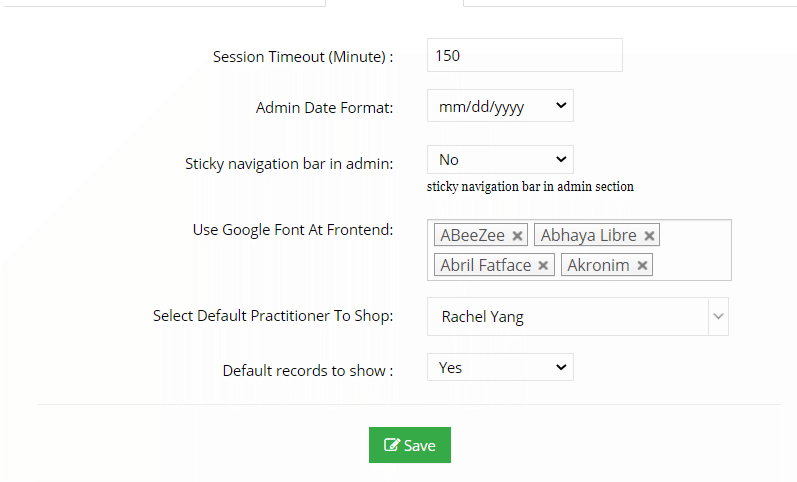
Available Settings
Session Timeout
Defines how many minutes an admin user can remain logged in without activity before being automatically logged out.
This helps improve account security.
Admin Date Format
Controls how dates are displayed in the Admin portal.
To change the date format in the Practitioner Portal, go to
Admin → Settings → Practitioner Website → General
Sticky Navigation Bar
-
Yes – The admin left navigation menu retracts/minimizes to provide more workspace
-
No – The navigation menu remains fully expanded at all times
This setting affects layout preference only.
Use Google Font at Front End
Select the Google Font used across all websites, including:
-
Admin portal
-
Practitioner portal
-
Patient portal
You can enter the name of any Google Font.
Select Default Practitioner to Shop
When shopping or creating orders from the Admin interface, this setting determines which practitioner account is selected by default.
This is useful if:
-
Admin frequently places orders on behalf of a specific practitioner
-
You want to reduce repetitive practitioner selection
Summary
The Admin Portal settings allow you to:
-
Control session security
-
Customize date display
-
Adjust navigation layout
-
Apply consistent typography across all portals
-
Streamline admin shopping workflows
These options help tailor the admin experience to your operational and security needs.